
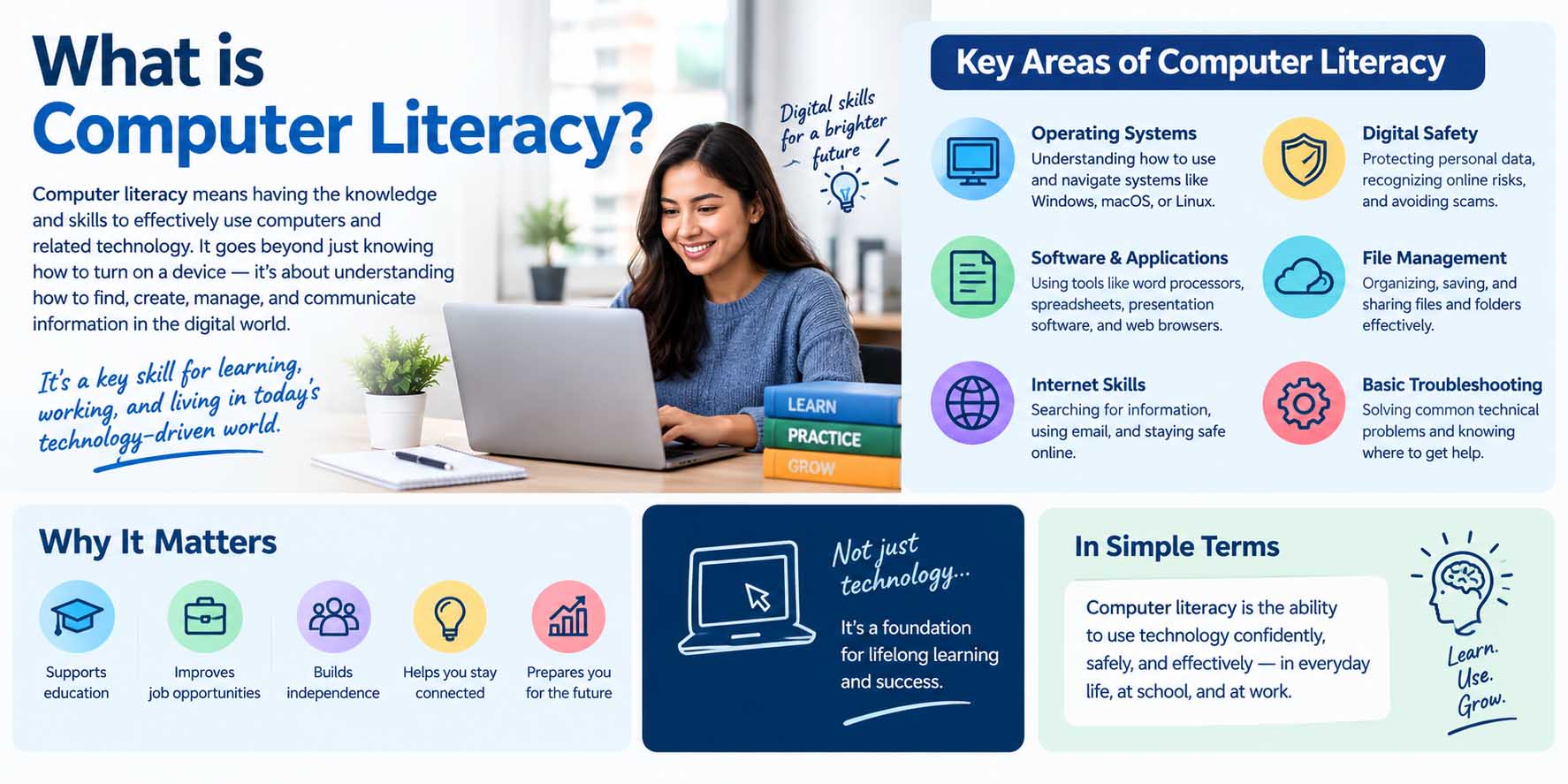
If you can open a document, search for reliable information online, send an email, organize files, and solve basic computer problems, you already have some computer literacy. So, what is computer literacy exactly? Computer literacy is the ability to understand and use computers, software, online tools, and digital information effectively and safely. However, it involves more than knowing where to click. A computer-literate person can choose suitable tools, complete everyday digital tasks, evaluate information, and handle common technology problems with confidence.
For students, these abilities support research, assignments, presentations, communication, and online classes. Meanwhile, adults use similar skills for work, banking, applications, communication, and everyday tasks. Because technology keeps changing, computer literacy is best viewed as a skill that develops through regular practice rather than something you learn once.
What Is Computer Literacy in Simple Terms?
Computer literacy means having enough knowledge and practical ability to use a computer for useful tasks. For example, a student who can create a document, save it in the correct folder, attach it to an email, and submit it through an online learning platform is demonstrating computer literacy.
However, knowing how to use one application does not automatically make someone fully computer literate. Instead, computer literacy combines several abilities, including basic hardware knowledge, software use, internet navigation, digital communication, file management, online safety, and problem-solving.
Therefore, when people ask what is considered computer literacy, the answer depends partly on the situation. A middle school student may need basic typing, research, and presentation skills. In contrast, a university student may also need spreadsheets, online collaboration, academic databases, and more advanced research skills.
Likewise, workplace expectations can vary significantly between careers. Still, the basic ability to use digital tools independently remains valuable in almost every field.
Understanding the Basic Parts of a Computer
Before learning advanced applications, students benefit from understanding what makes a computer work. For instance, they should recognize common physical components such as a monitor, keyboard, mouse, processor, storage device, webcam, and printer.
At the same time, students should understand that programs and operating systems are not physical components. A simple lesson on the difference between hardware and software can make later computer lessons much easier because learners begin to understand which parts they can physically touch and which parts provide digital instructions or functions.
Students do not need to understand computer engineering to become computer literate. Instead, they need enough knowledge to operate devices confidently and recognize basic problems. For example, knowing whether an issue involves an internet connection, application, peripheral device, or operating system can make troubleshooting much faster.
What Is Computer Literacy Skills in Everyday Learning?
The phrase what is computer literacy skills usually refers to the practical abilities that allow someone to work successfully with computers and digital resources. Although requirements differ by age and environment, several skills form a strong foundation.
File and Folder Management
Students should know how to create folders, name files clearly, save documents, move files, download resources, and find saved work later.
For example, instead of keeping every assignment in the Downloads folder, a student could create separate folders for English, science, mathematics, and other subjects. As a result, finding an assignment before a deadline becomes much easier.
Cloud storage also matters. Therefore, learners should understand the difference between files stored locally on a device and files saved through a cloud service.
Word Processing and Presentations
Word-processing software is one of the most common tools in education. Students should be able to type, format headings, create lists, adjust spacing, insert images, and save or export their work.
Similarly, presentation skills help learners organize information visually. However, effective presentation skills involve more than adding animations. Instead, students should learn to create readable slides, organize ideas logically, and avoid filling every slide with long paragraphs.
Spreadsheets and Basic Data Skills
Basic spreadsheet knowledge can help students organize information, perform calculations, and understand data.
For instance, a learner might use a spreadsheet to track study hours, calculate an average score, organize survey results, or create a simple chart. Therefore, even introductory knowledge of cells, rows, columns, formulas, and sorting can be useful.
Internet Research Is Part of Computer Literacy
Using a search engine is easy. However, finding accurate and useful information requires more judgment.
Students should learn how to create effective searches, compare multiple sources, identify authors or organizations, check publication dates, and recognize unsupported claims. As a result, computer literacy overlaps with information literacy and critical thinking.
For example, what is lateral reading introduces a useful research approach in which readers leave a webpage and check what other reliable sources say about its author, organization, or claims. Consequently, students become less dependent on how professional or convincing a single website appears.
Likewise, learners should distinguish advertisements from informational results. They should also understand that appearing near the top of search results does not automatically make a source accurate.
Online Safety and Responsible Computer Use
Computer literacy also includes knowing how to protect personal information and devices.
For example, students should use strong, unique passwords and recognize suspicious links or attachments. They should also know that messages asking for passwords, payment information, or urgent account verification may be phishing attempts.
Meanwhile, software updates should not be ignored indefinitely because updates often include security fixes. Likewise, students should understand privacy settings and think carefully before sharing personal information online.
Responsible computer use also includes digital behavior. Therefore, learners should communicate respectfully, follow classroom technology policies, cite sources appropriately, and avoid copying online material without attribution.
Critical Thinking Makes Digital Skills Stronger
Knowing how to operate a computer is useful, yet good judgment determines how effectively someone uses it.
For instance, a student may know how to search online but still struggle to decide which source deserves trust. Similarly, someone may know how to create a spreadsheet but choose an unsuitable way to display the data.
Practicing Critical Thinking Exercises can strengthen the reasoning skills behind computer literacy because students learn to compare evidence, question assumptions, identify patterns, and make informed decisions.
Therefore, computer literacy should not be taught only as a sequence of buttons and menus. Instead, students should understand why they are choosing a particular digital tool and whether it actually fits the task.
What Is Computer Literacy Experience?
When schools or employers refer to what is computer literacy experience, they generally mean practical experience using computers and common digital tools.
For example, computer literacy experience might include creating reports, managing email, attending virtual classes, entering information into spreadsheets, researching online, using cloud storage, or collaborating through shared documents.
Experience develops through practice. Therefore, a student does not necessarily need a formal computer course to build these abilities. Completing assignments, researching projects, creating presentations, and using educational platforms can all provide practical experience.
However, learners should avoid exaggerating their abilities. If you can perform basic spreadsheet tasks but cannot use advanced formulas, describing yourself as having “basic spreadsheet skills” gives a clearer picture of your current level.
Computer Literacy vs. Computer Science
Computer literacy focuses mainly on using computers and digital tools effectively. In contrast, computer science examines areas such as algorithms, programming, computational theory, data structures, and software development.
Therefore, you can be highly computer literate without knowing how to code.
Students considering technology careers may also find the difference between computer science and computer engineering useful because those fields involve different combinations of software, computing theory, electronics, and hardware.
Computer literacy can still provide a foundation for both areas. After all, becoming comfortable with operating systems, files, software, and problem-solving makes it easier to explore more technical subjects later.
How to Improve Computer Literacy Step by Step
You do not need to master dozens of programs at once. Instead, build practical abilities gradually and use them regularly.
1. Become Comfortable With Your Device
First, learn the basic settings and controls of the computer you use most often. Practice connecting to Wi-Fi, adjusting settings, installing approved applications, taking screenshots, and locating downloaded files.
2. Improve File Organization
Next, create folders for different subjects or projects. Then, practice naming files clearly rather than using names such as “document1” or “newfile.”
For example, “Biology_Cell_Project_May” immediately tells you what a file contains.
3. Practice Common Productivity Tools
After that, spend time using documents, spreadsheets, and presentation software. Instead of only watching tutorials, create something yourself.
For instance, write a one-page report, build a weekly study schedule in a spreadsheet, and turn a school topic into five presentation slides.
4. Strengthen Online Research Skills
Then, practice searching with specific phrases rather than typing broad questions. Compare several sources and look for supporting evidence.
Also, check who created the information and when it was updated. As a result, you will gradually become faster at separating useful sources from weak ones.
5. Learn Basic Troubleshooting
When something stops working, avoid immediately assuming the computer is broken. Instead, check simple possibilities first.
For example, confirm the internet connection, restart the application, check cables, review settings, or restart the device. Although these steps will not solve every problem, they can fix many everyday issues.
6. Keep Building New Skills
Finally, choose one new digital skill at a time. You might learn keyboard shortcuts this week and basic spreadsheet formulas next week.
Small improvements add up quickly when you practice consistently.
Computer Literacy in School and the Classroom
Computer literacy can support nearly every subject.
In English classes, students might research sources, format essays, and prepare presentations. Meanwhile, science students may organize experiment results in spreadsheets or use online simulations. In history, learners can access digital archives, while mathematics students may use graphing or calculation tools.
Teachers can also build computer literacy through ordinary assignments rather than treating it as a separate topic. For example, students might collaborate on a shared document, evaluate two websites, organize research files, or create a presentation from collected data.
As a result, digital skills become connected to meaningful academic work rather than isolated technology exercises.
Why Computer Literacy Matters for Future Careers
Many careers now require at least basic computer skills. Even jobs that are not considered technology careers may involve email, online scheduling, digital records, spreadsheets, inventory systems, video meetings, or specialized software.
Therefore, students can benefit from documenting the digital abilities they develop. When preparing for employment, reviewing skills to put on resume can also help learners describe relevant computer abilities accurately rather than simply writing “good with computers.”
For example, listing specific abilities such as word processing, spreadsheet basics, presentation software, online research, or digital collaboration provides more useful information.
Computer literacy also makes learning new workplace systems easier. Although every employer may use different software, someone who understands common digital concepts can often adapt faster.
Common Computer Literacy Mistakes
One common mistake is assuming that frequent smartphone use automatically equals strong computer literacy. Although smartphones build some digital familiarity, desktop file management, spreadsheets, formal documents, and workplace software often require different skills.
Another mistake is memorizing steps without understanding them. For example, a student may remember which button creates a chart but not understand which chart suits the information.
Similarly, some learners avoid experimenting because they worry about making mistakes. However, safe practice is one of the fastest ways to build confidence. Create test documents, explore settings, and try unfamiliar features when there is little risk of losing valuable work.
Finally, do not ignore cybersecurity. A technically skilled user can still create serious problems by reusing weak passwords or opening suspicious attachments.
FAQs About Computer Literacy
What is computer literacy?
Computer literacy is the ability to use computers, software, internet resources, and digital information effectively, responsibly, and safely. It includes practical skills as well as basic problem-solving and online judgment.
What is considered computer literacy for a student?
For most students, it includes typing, file management, word processing, presentations, online research, email, learning platforms, basic cybersecurity, and responsible digital communication. Older students may also need spreadsheet and collaboration skills.
Do computer literacy skills include coding?
Not necessarily. Coding can strengthen technical knowledge, but basic computer literacy focuses mainly on using computers and digital tools successfully. Therefore, someone can be computer literate without knowing a programming language.
How can students improve computer literacy quickly?
Students can improve by practicing real tasks. For example, they can organize school files, create documents and presentations, use spreadsheets, evaluate online sources, learn keyboard shortcuts, and troubleshoot simple problems.
Why is computer literacy useful in education?
Computer literacy helps students research information, complete assignments, communicate, collaborate, organize their work, and use educational resources. As a result, strong digital skills can support both independent learning and classroom success.
Build Computer Skills Through Regular Practice
Computer literacy grows when you use technology with a clear purpose. Therefore, start with everyday skills such as organizing files, creating documents, researching reliable information, and protecting your accounts. Then, gradually explore spreadsheets, collaboration tools, troubleshooting, and other skills that match your academic or career goals.
Rather than trying to learn every program, focus on becoming adaptable. Software will continue to change, yet the ability to learn new tools, solve basic problems, evaluate digital information, and work confidently with technology will remain valuable throughout school, work, and everyday life.