
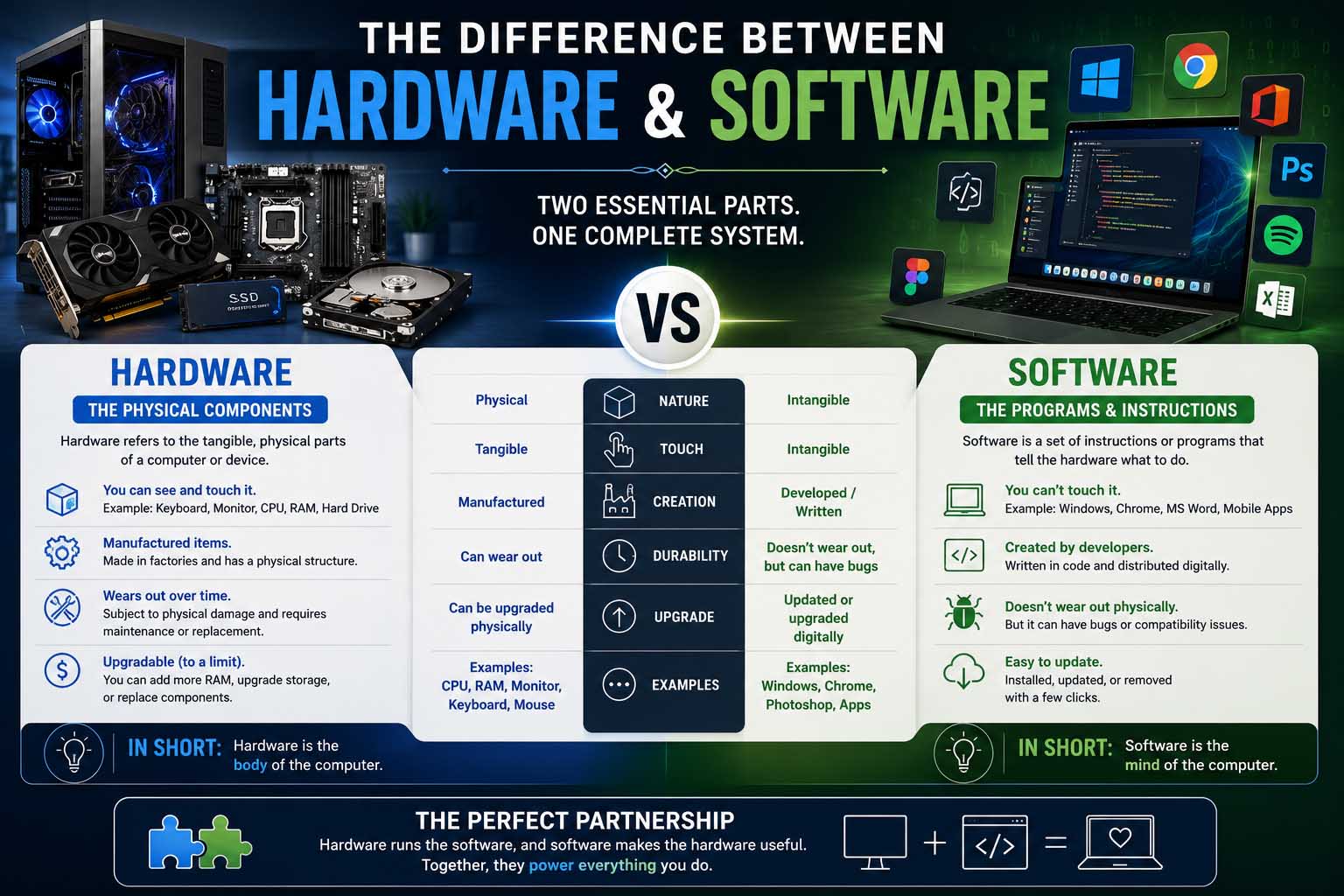
If you have ever wondered about the difference between hardware and software, you are not alone. It is one of the first ideas students learn in computer studies, because every computer system depends on both. Simply put, hardware means the physical parts of a computer that you can touch, while software means the programs and instructions that tell the computer what to do.
Whether you are preparing for an exam, learning basic computer skills or simply curious about technology, these two terms, therefore, make it much easier to see how computers work.
Understanding the Difference Between Hardware and Software
First, it helps to define each term on its own.
What Is Hardware?
First, hardware includes every physical component of a computer or electronic device. According to freeCodeCamp, hardware describes the physical parts of a computer system, and it is “hard” because it is difficult to change once someone has made it.
Common examples include the monitor, keyboard, mouse, motherboard, processor (CPU), graphics card (GPU), hard drive or SSD, RAM, printer and speakers. In addition, you can see, touch and replace these parts when needed. Without hardware, a computer cannot operate, because nothing exists to process or display information.
What Is Software?
Next, software is the collection of programs and instructions that run on hardware. The same source describes it as instructions or data that run on hardware, and it calls software “soft” because people can rewrite it.
Unlike hardware, software has no physical form. Instead, it exists as digital code that tells the computer how to perform tasks. Examples include Microsoft Word, Google Chrome, Windows, macOS, Linux, Android, iOS, Adobe Photoshop, video games and antivirus programs. In short, software lets you interact with hardware and complete everyday tasks.
Difference Between Hardware and Software at a Glance
Overall, the easiest way to understand the concept is a side-by-side comparison.
| Hardware | Software |
|---|---|
| Physical components | Digital programs and instructions |
| Can be touched | Cannot be touched |
| Built in factories | Developed through programming |
| Can wear out over time | Can become outdated or corrupted |
| Needs software to work well | Needs hardware to run |
| Examples: keyboard, CPU, monitor | Examples: Windows, Chrome, Excel |
Although they are different, hardware and software depend on each other. In fact, neither one works properly without the other.
What Is the Difference Between Hardware and Software?
For this reason, a simple way to remember the answer is this:
- Hardware is the body of the computer.
- Software is the brain that gives it instructions.
For example, imagine buying a brand-new laptop. The screen, keyboard, battery and processor are hardware. However, when you turn it on and open a browser or word processor, you are using software.
Without software, the computer would power on but perform no useful tasks. Likewise, without hardware, software would have nowhere to run.
Workplaces show this well. For instance, employees use computers to write emails, prepare presentations and work with colleagues. Understanding methods of business communication also helps students see how software such as email clients and video conferencing tools supports professional communication.
How Hardware and Software Work Together
Computers perform millions of operations every second because hardware and software constantly communicate. Here is a simple example of what happens when you click a browser icon:
- First, you press the mouse button (hardware).
- Then the operating system recognizes your click (software).
- Next, the processor handles the request (hardware).
- After that, the browser opens (software).
- Finally, the monitor displays the webpage (hardware).
Overall, this process happens almost instantly, and every action on a computer follows a similar pattern.
Common Examples of Hardware and Software
Furthermore, everyday devices make the idea even easier to see.
| Device | Hardware | Software |
|---|---|---|
| Laptop | Keyboard, display, processor, battery, webcam | Windows, Microsoft Office, Zoom, Spotify, web browser |
| Smartphone | Screen, camera, speakers, microphone, battery | Android, iOS, messaging apps, camera app, maps |
| Gaming console | Console, controller, storage drive, cooling system | Game operating system, video games, streaming apps, online services |
As a result, both parts are always working together, no matter which device you use.
Difference Between Software and Hardware in Everyday Life
Students often understand technology better when they compare it with familiar situations. For example, think about driving a car. The engine, tires, steering wheel and brakes are like hardware because they are physical parts. In contrast, the driver’s knowledge, the navigation instructions and the decisions are like software, because they control how the car operates.
Likewise, a television follows the same idea. The TV itself is hardware, while the streaming app you use to watch movies is software. Similarly, this idea applies to smartwatches, tablets, cash registers and modern home appliances.
Why Students Should Learn the Difference Between Hardware and Software
Understanding computers begins with these two ideas. For example, this topic appears in computer science classes, information technology courses, digital literacy lessons, competitive exams, job interviews and technology certifications.
If you are exploring tech careers, learning the difference between computer science and computer engineering can also show how hardware-focused and software-focused roles differ at work.
Types of Hardware
Overall, hardware usually falls into four groups.
| Type | What it does | Examples |
|---|---|---|
| Input devices | Let users enter data and commands | Keyboard, mouse, scanner, microphone, webcam |
| Output devices | Display or present information | Monitor, printer, speakers, projector |
| Processing devices | Perform calculations and run instructions | CPU, GPU, motherboard |
| Storage devices | Save data for later use | SSD, hard drive, USB flash drive, memory card |
For example, the processor acts as the computer’s central decision-maker. In addition, some storage is permanent, while other storage, such as RAM, holds data temporarily while programs run.
Types of Software
Software also divides into three main categories.
System Software
System software manages the computer itself. Examples include Windows, macOS, Linux and device drivers. Without it, therefore, the computer cannot operate properly.
Application Software
Application software helps users finish specific tasks. For instance, popular examples include Microsoft Word, Google Docs, Excel, Photoshop, Chrome and Zoom. In fact, students use these programs daily for homework, presentations, research and communication.
Utility Software
Utility software helps maintain and protect computers. Examples include antivirus programs, disk cleanup tools, backup software and file compression utilities. As a result, these programs improve performance and help keep systems secure.
Why Both Matter in Schools and Businesses
Hardware and software complement one another, so both are essential in education and at work. For example, a company may buy powerful computers with fast processors and plenty of memory. Even so, employees still need the right software to create documents, manage projects and analyze information. For this reason, technology supports nearly every part of what a business does, from customer service to accounting.
Likewise, students rely on reliable devices and learning apps to complete assignments, collaborate online and reach learning resources.
Practical Examples That Show the Difference
Example 1: Writing a School Report
First, imagine you are typing an assignment. The hardware involved includes a laptop, keyboard, monitor and processor. In addition, the software involved includes Microsoft Word, the operating system and a spell checker. The keyboard sends your keystrokes to the computer, while the word processor displays your work and saves your document.
Example 2: Watching a Video
For instance, when you stream a video, the hardware includes the screen, speakers, graphics card and Wi-Fi adapter. Meanwhile, the software includes a web browser, a streaming app and a video player. The software requests the video, and then the hardware shows the picture and plays the sound.
Example 3: Playing a Game
Finally, gaming also shows how both parts depend on each other. The console or computer provides the physical processing power, while the game is software that tells the hardware what to display, calculate and control. However, without enough hardware power, even well-designed software may run slowly.
Difference Between Hardware and Software in Maintenance
Although the two work together, they need different kinds of care.
Hardware maintenance is physical. For instance, you may clean dust from fans, replace worn batteries, upgrade memory (RAM), install a larger SSD or repair damaged cables. In particular, physical parts can wear out over time, especially moving parts.
Software maintenance, on the other hand, happens through updates. Typical tasks include installing security updates, fixing bugs, updating applications, removing unused programs and backing up important files. As a result, keeping software current improves performance, adds features and helps protect against security threats.
Common Misconceptions About the Difference Between Hardware and Software
Many beginners mix up the two because they need both to use a computer. Here are four common mistakes.
“The internet is hardware.” In fact, it is a global network that relies on hardware (servers, routers and cables) and software (browsers, protocols and websites).
“Windows is part of the computer.” Windows often comes installed, but it is software. For example, you can reinstall it or replace it with another operating system without changing the physical machine.
“Files are hardware.” Photos, videos, documents and music are digital information. Although they sit on hardware such as an SSD, the files themselves are not hardware.
“Replacing hardware fixes every problem.” However, slow performance sometimes comes from outdated software, too many background programs or viruses. Therefore, basic troubleshooting helps you decide whether the issue involves hardware or software.
Classroom Applications
Teachers often introduce this topic through hands-on activities. For example, students might label parts of a computer, match software with the hardware it uses, compare operating systems, build simple computer diagrams or identify both parts in everyday devices. These activities work well because students connect definitions with real examples.
When you review for quizzes, diagrams, flashcards and summary notes help as much as reading. In addition, learning how to create a study guide is an excellent way to organize computer science concepts and remember key differences.
Career Pathways That Use Hardware and Software
Moreover, this knowledge helps in many careers, such as IT support specialist, software developer, computer technician, systems administrator, network engineer, cybersecurity analyst, data analyst and computer engineer.
Some careers focus more on hardware, while others specialize in software development. Therefore, knowing the distinction helps students explore future educational paths with more confidence.
Why This Knowledge Matters at Work
Nearly every modern workplace depends on computers. In fact, whether someone works in healthcare, finance, education, retail or engineering, that person uses hardware and software every day. For example:
- For instance, cash registers combine physical equipment with sales software.
- Likewise, hospitals use computers alongside medical software.
- In addition, schools rely on classroom devices and learning platforms.
- Finally, offices depend on computers for communication and productivity.
As students prepare for internships or jobs, basic computer knowledge becomes a valuable foundation. Employers also value applicants who show technical knowledge alongside other skills to put on resume, especially for office and technology roles.
Study Tips for Remembering the Difference Between Hardware and Software
If you are preparing for an exam, these techniques make the topic easier to remember.
Use the “touch test.” Ask one question: can I physically touch it? If yes, it is hardware. Otherwise, it is software. Overall, this simple method works for most examples.
Create two lists. First, write one column labeled Hardware and another labeled Software. Then sort examples into the right category. For instance, monitor, mouse, CPU and printer go under hardware, while Windows, Excel, Chrome and Photoshop go under software. Sorting reinforces the definitions.
Practice with devices around you. Look at your laptop, tablet or smartphone, and try to find five hardware components and five software applications. In this way, the exercise connects classroom learning to everyday life.
Frequently Asked Questions
What is the difference between hardware and software?
Hardware means the physical parts of a computer, while software means the programs and instructions that tell the hardware what to do.
What is the difference between software and hardware?
The difference is mainly physical. For example, you can see and touch hardware, whereas software exists digitally and runs through code.
Can hardware work without software?
Not in a useful way. Instead, a computer needs software, such as an operating system, to perform tasks and let users interact with it.
Can software exist without hardware?
No. Instead, software must run on some type of hardware, whether that is a computer, smartphone, tablet or server.
Which is more important?
Neither is more important. In fact, designers build them to work together, and each depends on the other for a complete computing experience.
Is the CPU hardware or software?
The CPU, or central processing unit, is hardware. In fact, it physically processes the instructions that software provides.
Key Takeaways on the Difference Between Hardware and Software
In short, the difference between hardware and software is one of the most basic ideas in computer education. Hardware includes every physical component you can see and touch, while software includes the programs that make those components useful.
Once you understand how the two work together, many other technology topics become easier to learn. So, whether you are studying for a class, preparing for an exam or exploring technology careers, remember that hardware provides the equipment and software provides the instructions.